Posts

How to cancel a local GIT commit?

If you want to retain the changed content of the file and  cancel the last commit use:    git reset HEAD^ or git reset HEAD~1   ( both are same) If you dont want to retain the content of the changed file use: git reset --hard HEAD~1

How to update your GIT master branch with the changes made to other branches?

First step you need to do is:   git checkout master   git pull This will make sure you have the latest code from the github repository for the master branch. Now, you want to rebase your branch on top of the master branch.  git checkout branch_name  git rebase master If you want you can do an interactive rebase (git rebase -i master) and squish your commits into a single commit.  You may also have to resolve conflicts with other work that has been done since you branched off of master. Once you've done the rebase, you can then merge your changes into the master branch:  git checkout master  git merge branch_name Then you need to push your changes up to the remote branch so anyone can pull them down: git push origin master That's it you have successfully updated your master with the latest changes in the branch...!!!  

How to delete a branch in GIT ?

git branch -D branch_name (This removes the branch from our local) git push origin :branch_name (Branch is removed from our git repo.) Bulk delete branches in GIT git branch -r | grep -Eo 'feature/.*' | xargs -I {} git push origin :{} This will delete all branches starting with feature/ After deleting all the branches from GIT. To delete the branches locally run the following. git branch | grep -Eo 'feature/.*' | xargs -I {} git branch -D {} or git remote update --prune

How to pull changes in one branch to another branch in GIT

git fetch origin git checkout branch_name1    (The branch you need to update) git pull origin branch_name2   (From which branch you need to update, if you need to update from master use master. Actually master can be also considerd as a branch)

How to create a branch in GIT

Clone the current git repository: git clone git@github.com:amal/test.git Go to the cloned directory: cd test git checkout -b test_branch master   (Switched to a new branch test_branch") To check if the branch exist issue the command git branch   you could get an out put like * test_branch master git push origin test_branch (Now you can see the new branch in your git hub)

GIT installation on Windows and Generating SSH keys

Image
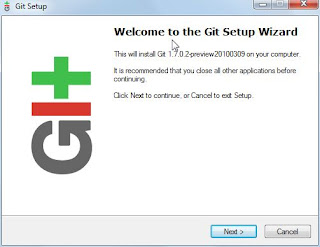
Download msysgit .  Double click on the .exe  Once installed, when I click the Windows button and type git (since I’m using Windows 7) I'll see 'Git Bash', 'Git Gui', 'Uninstall Git'.  Click 'Git Bash' .  Once I have the git bash open, I run 'git –version'  to make sure everything is working: Generating the Secure Shell (aka SSH) Keys If you have an existing keypair you wish to use, you can skip this step . Now it’s time to generate a new keypair. Lets make an RSA keypair: $ ssh-keygen -t rsa  -C "amal9994kumar@gmail.com" Enter  the file name as id_rsa   Enter  the passphrase Confirm your passphrase You have generated two files id_rsa and id_rsa.pub Copy these two files( id_rsa and id_rsa.pub ) to the .ssh folder (found in the present working directory)  Now copy the key in the id_rsa.pub file and add it to your Github account. To test the w...
Ruby on Rails Installation on Windows 7

Image
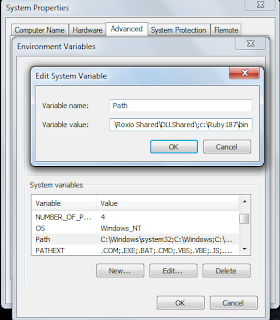
Get Ruby and the Development kit from here (this is one click installer) by default you install Ruby and Ruby Gems Next is to set the system environment variable. Quickest way: Open the control panel, search for 'environment', then click ' edit the system environment variables ' , and add the bin(c:\Ruby 187\bin) after a semicolon to the 'Path' variable.          Now type ruby -v in cmd prompt, you could see the ruby version installed. Our next aim is to install Rails. use gem install rails --include-dependencies . Check your rails version too rails -v . You could see the latest rails version installed. Installing Rmagick and ImageMagick. Download the rmagick-win32 package (zip file) . Install the gem by going into the directory it’s extracted into and then executing this: gem install rmagick-2.10.0-x86-mswin32.gem Then install ImageMagick itself, with the .exe that you just extracted as well. Getting started with a samp...