Posts

How to implement Log File Rotation in Linux Servers

NB: We are using CentOS Servers Switch to root user cd /etc/logrotate.d/  (by default we will be having this directory in our server) create a new file project-logs   vi project-logs Add the following piece of code to this file             /folder-path-of-your-log/*.log {                size=10M                missingok                rotate 20                compress                delaycompress                notifempty                copytruncate               daily           }       5.   logrotate -f /etc/logrotate.d/        This will create new log ...

How to SSH to remote server without entering password each time.

ssh -copy-id  example_user@www.example.com and give password once. Then you will be able to ssh without password next time onwards. Make sure you have a ssh key generated in your local machine. This works for Linux only (not Mac, Windows etc.) For Mac you need to first setup ssh-copy-id command & then copy the ssh key sudo curl https://raw.githubusercontent.com/beautifulcode/ssh-copy-id-for-OSX/master/ssh-copy-id.sh -o /usr/local/bin/ssh-copy-id sudo chmod +x /usr/local/bin/ssh-copy-id ssh-copy-id -i /path/id_rsa.pub example_user@www.example.com   Now you have your ssh-key copied to your server. You can now try your normal ssh login command without entering password

Server Fine Tuning Scripts

Provides a instant view of running resource usage https://community.rackspace. com/products/f/25/t/647 Apache Tuning scripts https://github.com/ gusmaskowitz/apachetuner (bash script) https://github.com/ gusmaskowitz/apachebuddy.pl (perl script that supercedes apachetuner) MySQL Tuning script https://github.com/major/ MySQLTuner-perl Resource usage logging https://github.com/rackerlabs/ recap

Capistrano Deployment in Rails 3 (via the rvm-capistrano gem)

Go to your project path. Add   gem 'rvm-capistrano' to your Gemfile Run bundle install for installing the gem Run the command  capify . This will create [add] writing './Capfile' [add] writing './config/deploy.rb' [done] capified! Modify the setting in your ./config/deploy.rb, sample settings is provided below  require "rvm/capistrano" set :application, "My Test App" # Your application name set :domain, "testapp.com" # Domain name for your app set :repository, "git@github.com:test/test.git" # The code repository url set :user, "test_user" # The ssh user that has access to your server default_run_options[:pty] = true set :use_sudo, false set :scm, :git set :deploy_via, :remote_cache set :deploy_to, "/home/test/test_project_production" # Server path to which the code is to be deployed role :web, domain # Your HTTP...

How to fetch the no: of weekly inserted records in MySQL

Image
SELECT   COUNT(*) AS reports_in_week,   DATE_ADD(created_at, INTERVAL(1-DAYOFWEEK(created_at)) DAY) as start_day,   DATE_ADD(created_at, INTERVAL(7-DAYOFWEEK(created_at)) DAY) as end_day FROM   your_table_name GROUP BY   YEAR(created_at) + .01 * WEEK(created_at) The desired output will be.

How to add Startup Script for MySQL or any other services in Centos/RedHat

Note: Perform the below steps as root user 1) Find out the name of service’s script from /etc/init.d/ directory e.g. mysqld or httpd 2) Add it to chkconfig chkconfig --add mysqld 3) Make sure it is in the chkconfig chkconfig --list mysqld 4) Set it to autostart chkconfig mysqld on Note: To stop a service from auto starting on boot chkconfig mysqld off If you have IPTables you need to flush them  and save that, So that on every reboot we get a flushed iptable. 1) iptables -F 2)  service iptables save

How to redirect a URL in NGINX

How to redirect a http://test.com to http://www.com Your main server block will be like server {             listen       80;             server_name  www.test.com;             client_max_body_size   10M;             client_body_buffer_size   128k;             root       /home/test/test/public;             passenger_enabled on;             rails_env production;             error_page   500 502 503 504  /50x.html;       ...

ImageMagick Installation in Centos

Run the commands as root user  yum install ImageMagick ImageMagick-perl yum install ImageMagick-devel gem install rmagick Now restart your server and you are ready to shoot..!!

How to reset MySQL Root password

service mysqld stop (To stop the currently running MySQL instance) mysqld_safe --skip-grant &   (To enter into MySQL in safe mode) use mysql; update user set password=PASSWO RD("NEW-ROOT-PASSWORD" ) where User='root';   (To set the new root password) service mysqld restart (To restart the MySQL instance)

How to set GIT (master or branch) to a previous commit version

First you need to switch to the desired location master or branch git checkout master or branch_name Then git push -f origin commit_id:mast er  (For master) git push -f origin commit_id:branch_name ( For branch) Then you also need to cancel your local commit git reset --hard commit_id (from the desired location)

How to Ignore certain files from Git commit (modified but never need to commit)

Sometimes we may need to ignore certain modified files from Git commit (Eg: config/database.yml). This can be done by issuing  the following command from your project path git update-index --assume-unchanged config/database.yml Or in case of folder git update-index --assume-unchanged folder-name/ In the case of a new folder or file (Not added to GIT before) we can ignore by adding it to .gitignore file Create a .gitignore file if doesn't exist in your project path Add the required folder or file path in it.            # Ignore bundler config              .bundle          # Ignore the default SQLite database.             db/*.sqlite3          # Ignore all logfiles and tempfiles.            log/*.log            tmp

How to Set user name and email globally in git

Git needs to know your username and email address to properly credit your commits. Setting this setting will also let GitHub link the commits you make to your GitHub account. Only commits made after you change this setting will use the new info, old commits will preserve the info they were committed with. The 'email' setting does not have to be a valid email address, it only need match the 'user@server' naming scheme. git config --global user.name "amal" git config --global user.email "amal@gmail.com" NOTE:-   For more GIT Configuration files info  http://www.geekgumbo.com/2010/04/19/git-config-files/

MySQL: How to grant permission to a database for a particular user.

Login to mysql grant select, insert, update, delete, create, drop, create routine ,  index, alter, create temporary tables, lock tables on db_name.* to user_name@localhost identified by 'password'; Thats it. Your user now has the permission to access the database.

How to add Apache level security to a website.

Hope you have apache installed and your application is running on it. 1. Create a .htaccess file in your project folder            vim .htaccess 2. Add the following lines to the file           AuthType Basic           AuthName "By Invitation Only"           AuthUserFile /Users/home/password_file   #(path to store your u/p)           Require valid-user        3. Run the command            sudo htpasswd -c /Users/home/password_file amal    # (Generates a user - amal & crypted password)  4. Restart Apache  if needed 

How to cancel a local GIT commit?

If you want to retain the changed content of the file and  cancel the last commit use:    git reset HEAD^ or git reset HEAD~1   ( both are same) If you dont want to retain the content of the changed file use: git reset --hard HEAD~1

How to update your GIT master branch with the changes made to other branches?

First step you need to do is:   git checkout master   git pull This will make sure you have the latest code from the github repository for the master branch. Now, you want to rebase your branch on top of the master branch.  git checkout branch_name  git rebase master If you want you can do an interactive rebase (git rebase -i master) and squish your commits into a single commit.  You may also have to resolve conflicts with other work that has been done since you branched off of master. Once you've done the rebase, you can then merge your changes into the master branch:  git checkout master  git merge branch_name Then you need to push your changes up to the remote branch so anyone can pull them down: git push origin master That's it you have successfully updated your master with the latest changes in the branch...!!!  

How to delete a branch in GIT ?

git branch -D branch_name (This removes the branch from our local) git push origin :branch_name (Branch is removed from our git repo.) Bulk delete branches in GIT git branch -r | grep -Eo 'feature/.*' | xargs -I {} git push origin :{} This will delete all branches starting with feature/ After deleting all the branches from GIT. To delete the branches locally run the following. git branch | grep -Eo 'feature/.*' | xargs -I {} git branch -D {} or git remote update --prune

How to pull changes in one branch to another branch in GIT

git fetch origin git checkout branch_name1    (The branch you need to update) git pull origin branch_name2   (From which branch you need to update, if you need to update from master use master. Actually master can be also considerd as a branch)

How to create a branch in GIT

Clone the current git repository: git clone git@github.com:amal/test.git Go to the cloned directory: cd test git checkout -b test_branch master   (Switched to a new branch test_branch") To check if the branch exist issue the command git branch   you could get an out put like * test_branch master git push origin test_branch (Now you can see the new branch in your git hub)

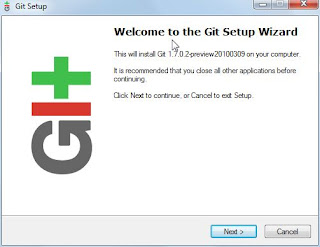
GIT installation on Windows and Generating SSH keys

Image
Download msysgit .  Double click on the .exe  Once installed, when I click the Windows button and type git (since I’m using Windows 7) I'll see 'Git Bash', 'Git Gui', 'Uninstall Git'.  Click 'Git Bash' .  Once I have the git bash open, I run 'git –version'  to make sure everything is working: Generating the Secure Shell (aka SSH) Keys If you have an existing keypair you wish to use, you can skip this step . Now it’s time to generate a new keypair. Lets make an RSA keypair: $ ssh-keygen -t rsa  -C "amal9994kumar@gmail.com" Enter  the file name as id_rsa   Enter  the passphrase Confirm your passphrase You have generated two files id_rsa and id_rsa.pub Copy these two files( id_rsa and id_rsa.pub ) to the .ssh folder (found in the present working directory)  Now copy the key in the id_rsa.pub file and add it to your Github account. To test the w...